
6 Best Interactive Sales Video Examples to Boost Your Close Rate
Why Traditional Sales Videos Aren't Enough
Ever spent hours crafting the perfect video pitch—only to be ghosted? You're not alone. According to Wyzowl, 78% of salespeople say video helps increase sales, yet only a fraction see consistent results. Why? Because most sales videos are one-way streets—watch, yawn, exit.
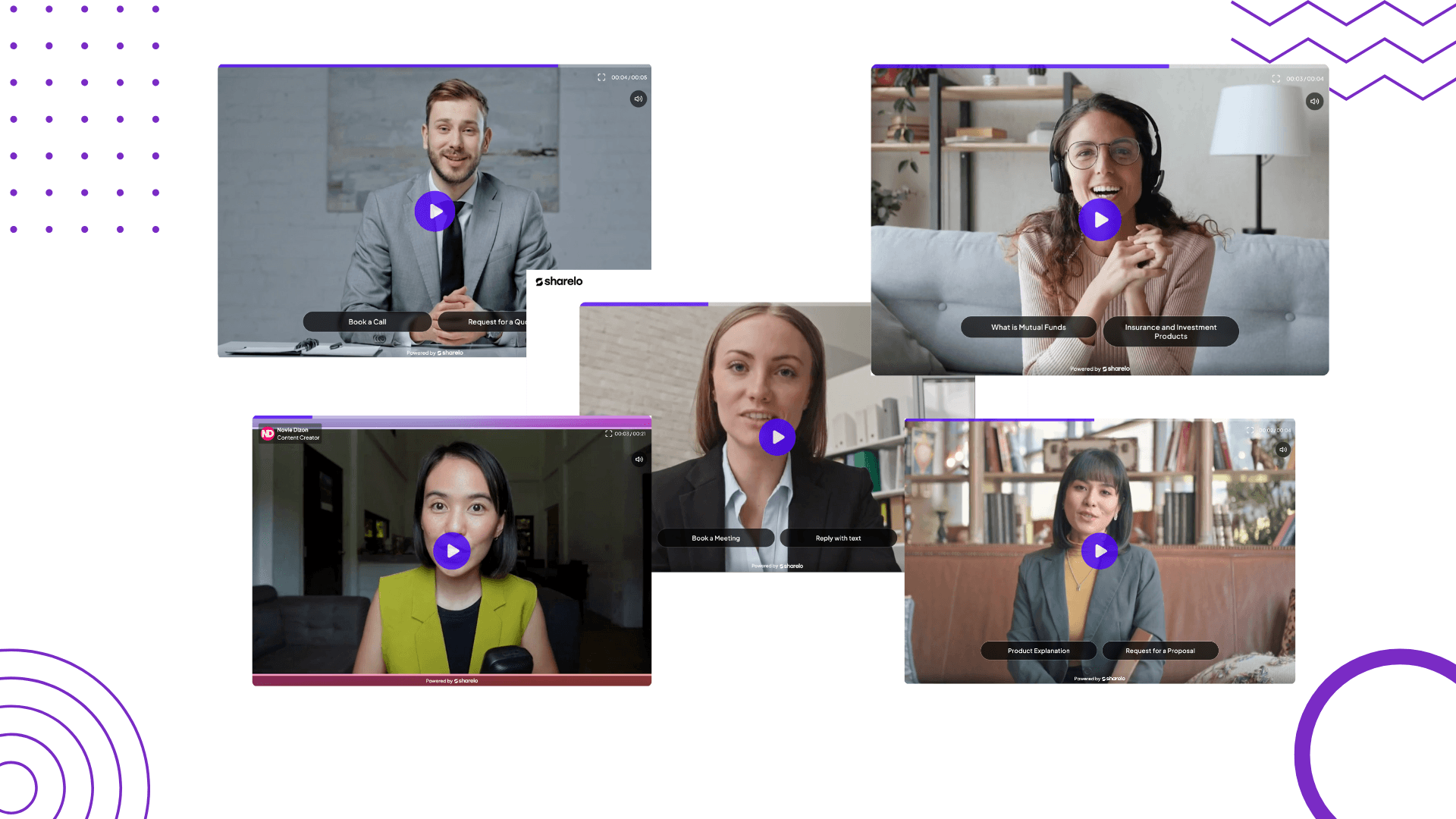
That’s where interactive videos change the game. They don’t just show your message—they let your viewer participate in it.
Imagine giving your viewer the power to choose what they want to see next. Want a demo? Click here. Need pricing? Click there. It’s like building a personalized conversation within your video.
This article dives into the best interactive sales video examples that not only engage—but actually convert.
What Makes a Sales Video "Interactive"?
Interactive videos let users engage directly within the video. They might:
- Choose their own path (branching video)
- Answer a quiz
- Book a meeting
- Click on shoppable links
- Fill out a form
This transforms a passive viewer into an active participant—drastically increasing engagement and intent.
Best Interactive Sales Video Examples
1. Sales Pitch Video
Use case: Cold outreach or product intro
Instead of a generic "Hi, let me tell you what we do," let your video ask questions like:
- "Are you a small business or an enterprise?"
- "Want to see results or pricing first?"
Why it works: Customizes the flow based on viewer intent.
Best Practice: Use interactive elements like polls, buttons, or branching paths to personalize.
How to create a sales pitch video:
You can record your video directly with Sharelo, or use tools like Loom or Tella to record and CapCut to edit—then upload it to Sharelo.
How to Create Free Interactive Sales Pitch Videos with Sharelo
2. Prospecting Video
Use case: Initial contact or discovery stage
Ask prospects what challenges they're facing, then direct them to tailored solutions within the video.
Interactive features:
- Click-to-view case studies
- Buttons to select pain points
- Quiz-style segmentation
How to create a prospecting video:
You can record your video directly with Sharelo, or use tools like Loom or Tella to record and CapCut to edit—then upload it to Sharelo.
3. Sales Presentation Video
Use case: Replacing live Zoom demos
Include:
- Interactive product demo
- Feature toggles (click to reveal more info)
- Book a meeting directly from video
Example: Sharelo's interactive demos let you walk through their software and choose which features to explore.
How to create a sales presentation video:
You can record your video directly with Sharelo, or use tools like Loom or Tella to record and CapCut to edit—then upload it to Sharelo.
4. Follow-Up Video
Use case: Post-call or email follow-up
Let your lead:
- Rewatch key parts of your presentation
- Click to download resources
- Choose next steps (book a call, watch a customer story, etc.)
Why it works: Keeps the conversation going asynchronously.
How to create a follow-up video:
You can record your video directly with Sharelo, or use tools like Loom or Tella to record and CapCut to edit—then upload it to Sharelo.
5. Book a Meeting Video
Use case: Funnel conversions
Embed a calendar link right inside the video. Viewer watches your 1-minute pitch and books a call without leaving.
Tool Tip: Sharelo makes this process seamless. Try it free.
6. Generate Leads with a Quiz Video
Use case: Top-of-funnel lead gen
Create a short video quiz:
- "What kind of solution fits your business?"
- "Find your perfect plan in 30 seconds"
Gated lead form at the end collects info.
How to Create Interactive Videos with Sharelo (for Free)
- Sign up for a free Sharelo account
Go to www.shareloapp.com and sign up. - Upload or record your video
Use a sales pitch, product demo, or explainer. You can also use screen recording tools like Loom and Tella, or CapCut to edit your video then upload it to Sharelo. - Add interactive elements
Use:
- Buttons
- Branching paths
- Calendly integrations
- Lead capture forms
- Text or Video reply options
- Embed or share your video
Host it on your site, email it, or share as a link. - Track engagement
See what viewers clicked, watched, and where they dropped off using Sharelo Analytics.
FAQ: Interactive Video for Sales
Q: Do I need to code to create interactive videos?
A: No. Tools like Sharelo make it drag-and-drop easy.
Q: What types of businesses benefit from interactive videos?
A: SaaS, ecommerce, coaching, real estate, finance—basically any sales-driven business.
Q: Can I use interactive videos in emails?
A: Absolutely. Use a thumbnail + play button that links to your Sharelo video.
Q: How long should my interactive video be?
A: Aim for 1–3 minutes with clear, clickable paths.
Q: Are interactive videos mobile-friendly?
A: Yes! Sharelo and other platforms optimize for all devices.
Final Thoughts
The best interactive video examples aren’t just flashy—they’re functional. They respect your prospect’s time, guide them toward the next step, and give them control.
If you’re a marketer looking to boost engagement, personalize sales outreach, or simplify lead generation, it’s time to use interactive videos.
Start now for free with Sharelo and turn your static videos into conversations that convert.
Book a Demo or Share Your Feedback
We’d love to hear from you!
Whether you're curious about how Sharelo can help your business or you have suggestions to make us better, we've made it easy for you to reach out.
👉 Watch the interactive video below to:
- Book a personalized demo
- Share your thoughts and feedback
- Ask questions directly
The Complete Toolkit: Turn Every Touchpoint Into a Conversion Opportunity
As a content creator and marketer, I personally use these tools to create organic content and grow my audience. Check out how I use these tools with detailed reviews and demos on my blog section, where I share actionable tips to help startups build a strong online presence—even without a huge marketing team.
Summary of Sales and Marketing Tools
Screen Recordings That Actually Sell Your Product
Gone are the days of boring product demos. Create video walkthroughs that prospects can't stop watching – and that drive them to take action.
Top Tools for High-Converting Screen Recordings:
Video walkthroughs are a powerful way to showcase your product’s value. Tools like Loom, Tella, Descript or CapCut allow you to create clear, engaging screen recordings—like a personal demo your audience can watch anytime.
Tool #1: Tella (AI-Powered Screen Recording Tool)
Loom vs Tella
Visit my YouTube channel for more Tella vs Loom comparison videos.
Create beautiful screen recordings that engage viewers and transform hours of editing into minutes.
Features that matter:
- AI Magic Trim that automatically removes buffers, awkward pauses and filler words.
- Auto Zoom for perfect focus on key details
- Auto Layouts to make editing faster and and keep viewers engaged (Watch Auto Layout demo here)
- Collaborative editing for team efficiency (Watch collab editing video here)
- Beautiful backgrounds that make you look professional
- Edit Vertical videos
- Export in 4k
- 30% Discount
Perfect for creating any video content and product demos, tutorials, and online courses that prospects actually finish watching.
More resources about Tella:
1. Tella vs Loom Pricing comparison
2. Best tool for content creators
3. Loom vs Tella 2025 Review
4. Edit like Deya or Ali Abdaal using Tella
5. Complete Tella honest review
Tool #2: Descript (Audio and Video Editing Made Simple)
Write your script, and your video edits itself. The simplest way to create polished product walkthroughs without the learning curve.
Tella vs Descript
Tool #3: CapCut (Free, Easy-to-Use Editing for Web and Mobile)
Capcut is one of the best free video editing tools out there and best for social media. Learn how to use CapCut in the video below.
How to record screen on CapCut
Learn CapCut Desktop in 10 minutes
CapCut Mobile for Beginners
Pro Tip: Combine any of these tools with Sharelo to make your recordings interactive. Add clickable choices, capture viewer data, and turn passive watchers into active prospects.
Tool #4: Dub (Simplify Your Links with Modern URL Shorteners)
Stop guessing which marketing efforts drive results. Dub (the free Bitly alternative) gives you the insights you need:
- Track click-through rates in real-time
- Optimize campaigns based on actual data
- Create branded short links that build trust
- Streamline your entire link workflow
Bitly vs Dub Which Link Shortener Is Better
Tool #5: Cal (Scheduling That Doesn't Break the Bank)
Cal.com delivers everything Calendly does – without the recurring fees eating into your profit margins. Free scheduling that actually scales with your business.
Tool #6: Sharelo (Video Commerce and Interactive Platform)
Sharelo is a free interactive video and commerce platform that you can use to generate leads and create shoppable video feeds and carousels—perfect for boosting sales in your online business.
How to Create Interactive Video for Free with Sharelo
Ready to See Real Results?
Every tool mentioned here works 10x better when combined with Sharelo's interactive capabilities.
Your next step: Watch our interactive demo above and discover how businesses like yours are closing more deals with less effort.
Need more inspiration? Check out our Sharelo YouTube channel or my YouTube channel (Novie Dizon) for advanced strategies and real-world case studies.